 HAVE ANY QUESTIONS?
  15 YEARS OF EXPERIENCE
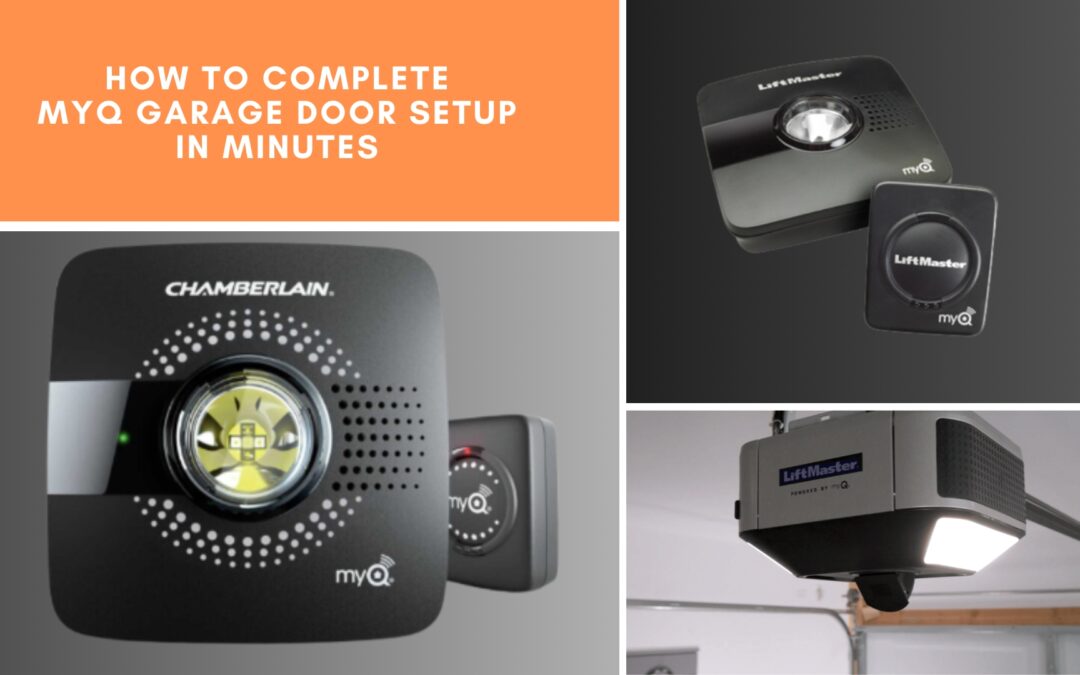
Smart technology has made life easier in so many ways, and your garage door is no exception. With a myQ garage door setup, you can open, close, and monitor your garage door right from your smartphone. No more turning the car around to check if you closed the door. Most importantly, you won’t have to worry when you head out of town.
At Titan Garage Doors Des Moines, we have helped homeowners across neighborhoods like Beaverdale and Waveland Park set up their best smart garage door openers in no time. Today, we will walk you through how to complete your smart garage opener setup in just a few minutes.
Why myQ Garage Door Setup Is a Game-Changer
Before we dive into the setup, let’s talk about why myQ has become one of the best smart garage door opener control systems out there. It is not just some tech—it is a real lifestyle upgrade.
Imagine getting a notification while you are at Gray’s Lake Park telling you your garage door has been left open. Or being able to let a neighbor into your garage while you are at work in Downtown Des Moines. myQ gives you that control. If you’re searching for a smartphone garage door opener or a smart garage opener setup near me, you’re on the right track. Now let’s get started.
Step 1: Check if Your Garage Door Opener Works With myQ
Before you get too far, make sure your opener will even work with myQ. Skipping this step is like sitting in the driver’s seat, turning the key, and realizing you grabbed the wrong set. The good news? Many newer models (made after 2014) from LiftMaster, Chamberlain, and Craftsman already have myQ built in.
If your opener is older, do not worry—you can still enjoy smart features by adding a myQ Smart Garage Hub. This little device acts as the bridge between your existing opener and your phone.
Pro Tip: If you are unsure, you can check the compatibility tool on the myQ website or give Titan Garage Doors Des Moines a call. We have done smart garage door installation in Des Moines for every type of opener system.

Step 2: Get Everything You Need Before You Start
A smooth, smart garage door opener setup starts with having everything ready:
- A compatible opener or myQ Smart Garage Hub
- Reliable 2.4 GHz Wi-Fi connection in your garage (myQ doesn’t work with 5 GHz networks)
- Your phone or tablet that has the myQ app downloaded
- A free myQ account (you’ll set this up in the app)
- Optional accessories if you plan to connect to Alexa, Google Assistant, or Apple HomeKit
If your Wi-Fi signal is weak in your garage, a Wi-Fi extender can help. Many homes in older parts of Des Moines, like Sherman Hill, have thick walls that can reduce signal strength, so it is worth checking.
Step 3: Download the myQ App and Create Your Account
Let’s get the tech part out of the way. Get your phone, go to the App Store or Google Play, and download the myQ app. That is where you’ll control and keep tabs on your garage door from anywhere.
Once installed, open it up and create your free account—you will use it to get alerts, check door activity, and modify settings.
Important Security Reminder: Pick a password you don’t use anywhere else, and later, turn on two-factor authentication to keep things locked down.
Step 4: Power Up and Prepare Your Garage Opener
Now, it is time to get your device ready:
- If you have a built-in myQ opener, just make sure it’s plugged in and the power light is on.
- If you are using the Smart Garage Hub, plug it into a power outlet near your opener. You will see a light on the hub when it is ready.
Local Tip: In some older homes around Des Moines, outlets in the garage can be further from the opener. You might need an extension cord for the hub placement. Aim for a spot with a strong Wi-Fi signal. The best hub placement? It is on the ceiling beam near the opener or on a high shelf away from metal obstructions.
Step 5: Connect myQ to Your Wi-Fi
This step is the part where it all comes together. Open the app and walk through the prompts to hook up your opener or hub to your Wi-Fi. Remember, it must be the 2.4 GHz band.
Here’s the trick: Stand near your garage opener while doing this. The closer your phone is to the hub or opener, the smoother the process. If your network name doesn’t appear, double-check that your router is broadcasting the 2.4 GHz signal. Consider adding a Wi-Fi extender so your smart garage door opener setup stays reliable.
Step 6: Pair Your myQ Device With Your Opener
Time to connect your device to the app.
- Built-in myQ: Press the “Learn” button on your garage door opener’s motor housing (usually near the light bulb). Then, follow the app’s instructions to complete pairing.
- Smart Garage Hub: The app will guide you to pair the hub with the door sensor first, then with your garage door opener.
Sometimes, your device may ask for a quick firmware update before pairing finishes. Let it run to avoid connection issues later. Watch for on-screen confirmation. The app will let you know once the pairing is successful.
Step 7: Test and Customize Your myQ Garage Door Setup
Press the “Open” button on the app to open your garage door. Step inside to check that it opens and closes easily, and then give it another go to be sure.
After that, make it your own:
- Turn on door activity alerts so you know the moment it opens or closes.
- Share access with trusted family members or a neighbor you count on.
- Set a nightly close time—9 PM works great if you want peace of mind before bed.

Troubleshooting Your myQ Garage Door Setup
Even the best smart garage door installation Des Moines can hit a snag. Here are quick fixes we use in the field:
- Hub won’t pair? If you want to reset it, hold down the reset button until the light flashes. Then try again.
- Weak Wi-Fi signal? Move your router closer or use a Wi-Fi extender.
- App won’t connect? Make sure your phone and device are on the same network during setup.
If you are still stuck, Titan Garage Doors Des Moines can install smart garage door openers and set up everything for you.
Bonus: Connect myQ to Your Smart Home System
Want to go a step further? myQ can integrate with Alexa, Google Assistant, or Apple HomeKit for voice control and automation. Just remember:
- Alexa and Google often require a myQ subscription.
- Apple HomeKit needs the myQ Home Bridge accessory.
Once connected, you could say, “Hey Siri, close the garage door” while you are heading out to the Downtown Farmers’ Market.
Expert myQ Garage Door Setup Across Des Moines
Ready to upgrade your garage with smart tech that works seamlessly from day one? Whether you’re stuck, need an upgrade, or just want the job done fast, Titan Garage Doors Des Moines has you covered. From East Village all the way to West Des Moines, we have helped hundreds of neighbors get their myQ garage door openers set up just right—from finding the best Wi-Fi spot to placing the hub exactly where it works best.
Plus, with our Service Now, Pay Later plan, you can get started without the usual upfront hassle. If you’re still wondering, take a look at what some of our customers have shared on Google—they appreciate our quick, honest, and down-to-earth service.
So, why wait? Take control of your garage from your phone and enjoy the smartest, safest way to come home. Call us today at (515) 650-6850 for a hassle-free garage door setup in and around Des Moines.